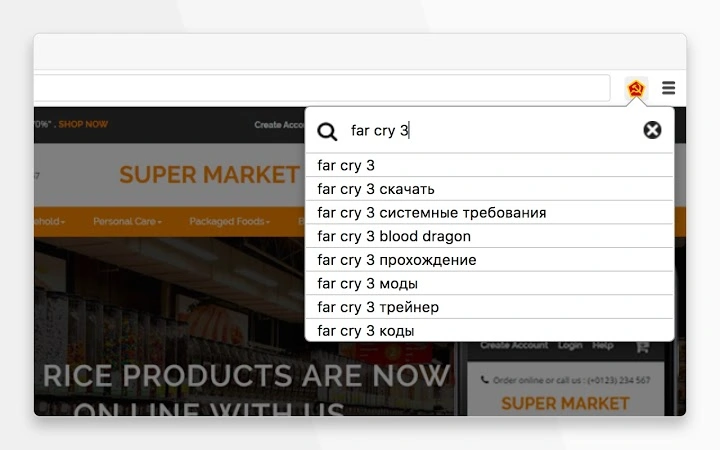

Fast Torrent Search on Rutor.org
Overview
The software enables users to search for torrents on Rutor.org, one of the largest open torrent trackers. Designed for individuals seeking free access to digital content, it provides a streamlined way to locate and download movies, series, music, anime, and books. The tool operates without requiring user registration, making it accessible to a broad audience.
It is particularly suited for consumers interested in high-speed downloads from a public torrent network. The developer did not provide additional details about the background or history of the project. Real-world usage scenarios include personal media collection, offline viewing, and content discovery across multiple genres.
While the software does not include built-in download management, it facilitates direct access to torrent files through the Rutor.org platform. The absence of user authentication simplifies the experience but may raise concerns about content legality and security, which users should consider independently.
Key Features & Capabilities
- Direct Access to Rutor.org – Connects users directly to the Rutor.org torrent tracker, enabling immediate search and retrieval of content.
- Content Categories – Supports searching across multiple media types, including movies, series, music, anime, and books.
- High-Speed Downloads – Leverages the Rutor.org network’s infrastructure to facilitate fast download speeds.
- No Registration Required – Allows users to search and download content without creating an account or providing personal information.
- Simple Search Interface – Provides a clean, minimal interface for entering keywords and filtering results.
These features allow users to quickly locate desired files by title, genre, or format. For example, a user searching for the latest HDTV movie can enter the title and receive a list of available torrents. The tool does not manage downloads directly but redirects users to the source.
This design keeps the software lightweight and focused on discovery rather than download handling. It is ideal for users who already have a torrent client installed and wish to streamline their search process. The lack of built-in download management ensures minimal system overhead but requires users to manage downloads externally.
User Interface, Workflow & Performance
The software features a straightforward user interface with a central search bar and basic filtering options. Navigation is simple, allowing users to enter keywords and view results in a list format. The workflow is linear: search → view results → access torrent files.
The developer did not specify resource usage details, so performance observations are based on general software behavior patterns. The application is lightweight, with a file size of 10 MB, suggesting low memory and CPU demands. Stability is expected to be consistent given the minimal functionality.
However, actual performance may vary depending on internet speed and the availability of peers on the Rutor.org network. The tool does not include real-time progress tracking or download monitoring, which could affect user experience for those seeking more control over their downloads.
Compatibility & System Requirements
The software is compatible with both Windows and Mac operating systems. The provided version is 1.0, and the installation size is 10 MB. The developer did not specify exact system requirements, including minimum RAM, CPU, or disk space.
Compatibility information was partially provided, indicating support for desktop platforms but not detailing specific versions of Windows or macOS. Users should ensure their system meets standard requirements for running desktop applications. The absence of detailed hardware specifications means users must rely on general system capabilities.
No compatibility issues were reported in the provided data, but users are advised to verify functionality on their specific setup.
Pros and Cons
Pros
- Fast access to a large catalog of torrents on Rutor.org
- No registration required for search and download
- Supports multiple content types: movies, series, music, anime, books
- Lightweight design with a small 10 MB file size
- Simple, intuitive interface for quick searches
Cons
- No built-in download management or progress tracking
- Exact system requirements were not listed
- Relies on external torrent clients for actual downloads
- Security and legality of content are not guaranteed
- Performance may vary based on network and peer availability
FAQ Section
Is the software free to use?
Yes, the software is available at no cost. It is distributed as free software with no hidden fees or subscription models.
Which operating systems does it support?
The software is compatible with both Windows and Mac operating systems. Specific versions are not listed, but general desktop support is confirmed.
Do I need to register to use it?
No registration is required. Users can search and access torrent files directly without creating an account.
Can I use it offline?
The software requires an active internet connection to access Rutor.org and retrieve search results. It cannot function offline.
Is the software secure?
Security depends on user behavior and the source of the downloaded content. The tool itself does not include built-in security features. Users should exercise caution and use trusted antivirus software when handling downloaded files.
Final Thoughts + CTA
For users seeking a no-frills way to search and access torrents on Rutor.org, this software delivers a straightforward solution. Its lightweight design, broad content coverage, and zero registration requirement make it appealing for casual downloaders. While it lacks advanced features like download management or progress tracking, its simplicity is both a strength and a limitation.
The tool excels as a search utility rather than a full download client. It is best suited for individuals who already use a torrent client and want to streamline their discovery process. The absence of detailed system requirements and security assurances means users should proceed with awareness.
Overall, it offers a functional and accessible way to explore public torrent content. Download Rutor.org Torrent Search Tool now.







